Inmate Search allows families and attorneys to locate a person in the Greenville County detention system within minutes. By entering an inmate name or ID, the online portal returns booking date, current custody status, housing location, and charge summary. The database updates multiple times daily, so recent bookings and releases appear quickly. Users can also view mugshots, bail amounts, and court docket links, making it simple to verify if someone is in jail.
Inmate Search also supports advanced queries such as inmate lookup by booking number or facility name, helping you find someone recently booked or recently released. If a record does not appear, it may be due to a processing delay or confidentiality restriction. Contact the county sheriff’s office for clarification, and remember the roster refreshes every few hours, ensuring that custody records stay current for public reference.
How to Search Inmate Search Records in Greenville County
An official county inmate roster can show whether Greenville County lists a person in custody at the time of its last refresh. It supports an inmate search by name or ID and can return booking date, custody status, housing location, and a charge summary. You can also explore greenville county sc to access countywide public services. This process answers how to find someone in jail, check an inmate’s jail location, or verify current custody status before travel. Treat each result as a snapshot rather than a live location service.
Official Search Portal: https://greenvillecountysc.gov/disclaimer/InmateSearch.aspx
Steps to Search
- Open the official page and read any disclaimer shown before the roster. Follow the on-page prompt after reviewing the stated terms.
- Choose the current inmate search or inmate roster option. A jail roster mainly shows people held by the facility at its latest update.
- Enter the person’s full legal name in the supported name fields. Exact spelling matters because common names and similar spellings can produce several different rows.
- Add an inmate ID or booking number when you have it. An inmate ID points to a roster entry, while a booking number points to a specific jail intake event.
- Apply a facility or custody-status filter only if the portal offers one. A facility filter narrows the Greenville County results but does not search jails in other counties.
- Submit the query and review every returned row. Do not select a person from the photo alone, since the photo may be older than the current booking.
- Compare the legal name, inmate ID, booking number, and facility before opening a result. These fields help separate people who share a name.
- Read the custody status, housing location, booking date, listed charges, and release fields. If a court docket link appears, use it to check case events rather than physical jail location.
- Record the date and time of the search. For a time-sensitive family matter, travel plan, or court deadline, verify the result through the official contact listing at the end of this page.
Reading Inmate Search Results
An inmate row brings together jail data, custody data, and links to related court records. Each field answers a different question, so one result should not be treated as a complete criminal case file. Read the roster status first, then use identity, location, charge, booking, and release fields to narrow the match.
Identification & Mugshot Details
Start with the inmate name, inmate ID, and booking number. The name confirms the person’s listed identity, while the two numeric identifiers help distinguish common names and repeated bookings. A mugshot can support a match, yet it serves only as a visual clue rather than proof of identity or guilt. The image may come from an earlier intake, and facial appearance can change after the booking photo was taken.
A missing photo does not by itself cancel the rest of the row. Some entries may lack an image because the record is partial, still being processed, or subject to a display rule. Compare the written identifiers before drawing any conclusion. If two rows have the same name, use the booking date, jail location, and inmate ID rather than choosing based on appearance alone.
Current Custody Status & Facility Location
Custody status describes the person’s state according to the roster’s last update. A current inmate entry may list the person as held at the detention facility. A release status may show that the jail no longer holds the person. Since transfers, releases, and new bookings can occur between refreshes, read the result as current only to the time shown by the portal.
- Facility location identifies the jail connected with the custody entry.
- Housing location may narrow the entry to a building, floor, pod, unit, or other internal assignment.
- Custody status gives the broader jail status; it does not describe what happened in every court case tied to the person.
Do not treat a street address as the person’s exact physical location. A detained person may move within the jail after the roster refresh. This distinction matters when calling about a detained person or planning a visit.
Charges, Bail Amounts & Case Information
A listed charge describes an allegation connected with the booking at that point. It does not establish a conviction, sentence, or final court judgment. The distinction protects against a common mistake: treating every person shown on an inmate roster as convicted simply because a charge appears on the jail page.
A bail amount is connected with the bond associated with custody release. It is not the same as a fine, restitution payment, damages award, or criminal sentence. A court docket linked from the roster may show filings, hearings, bond events, dispositions, or warrants. If the jail row and court docket differ in timing, the court record should be checked for the current case status.
Booking Dates & Projected Release Information
A booking date marks the jail intake entry recorded by the facility. It is a separate event from an arrest, conviction, or sentencing, even when those events happen close together. A recent booking date can help narrow a search when several people share a name.
A projected or scheduled release date reflects an expected event under the record at that time. The date may change because of a court order, bond matter, release review, transportation, or another custody decision. A listed date does not prove that release occurred at that exact time. Check the current status or obtain direct verification when timing affects travel, pickup, or another planned activity.
Find Jail Facilities & Inmate Locations
A custody search can point to the facility responsible for a person, but one county roster does not cover every jail or correctional system. Finding the right agency matters because a person may move between court jurisdiction, county custody, state custody, or another facility.
Locating the Correct County Facility
The Greenville County roster covers the county detention setting represented by this portal. A person named in a Greenville County court case may still be held by another jail, and a person arrested in one county may be moved after booking. Use the facility shown on current booking paperwork, bond paperwork, or the latest court entry when the county jail does not list the person.
A state prison, federal facility, and county jail operate separate custody systems. Their rosters use separate records and identifiers. A missing Greenville County result does not prove that the person is outside every form of custody; it may mean the person is held elsewhere or has not yet entered this roster.
Main Jail Addresses & Contact Information
Match the facility name in the inmate row with the county’s published facility listing before traveling. The final section of this page provides the Greenville County street address and phone number. That listing confirms the facility contact point, not an inmate’s current housing unit.
Do not assume that a public facility address answers every custody question. Administrative staff may need an inmate ID or booking number before they can discuss a specific record. Calling the wrong county or treating another jail’s address as the current facility can waste time and create confusion.
Check Current Housing & Unit Details
Housing or unit details describe the internal place assigned to a person at the last roster update. The person may later move to another unit without a new public search. For that reason, treat an old housing field as a clue rather than a promise that the person will remain there.
Reopen the roster close to the time you need the location. If a visit, transport, or family contact depends on the assignment, verify the facility and current status through the official contact method. Do not travel to an internal unit based only on a stale row.
How to Visit & Contact an Inmate
A custody result confirms what the jail listed at its last refresh; it does not set visitor hours or contact rules. Greenville County visitation, phone, mail, and property procedures can change, so the facility’s current written instructions control each contact method.
Inmate Visitation Rules & Requirements
Begin by confirming that the roster still shows the person in custody and names the expected facility. Review the current visitor instructions before registering or leaving home. Users can also reference inmate population for additional information. Those instructions should state whether prior approval, an online account, photo ID, an age limit, scheduled visiting hours, fees, approved dress, or specific entry rules apply.
Do not copy a requirement from another county jail. Greenville County may use different registration steps, entrances, payment methods, and screening rules. A facility that remains open through all hours does not mean visitation occurs at any hour. Visitor service, mail processing, and administrative office hours can be narrower.
A Short Visit Checklist
A visit is more likely to proceed without delay when each step is checked before departure.
- Reopen the inmate roster and confirm the current custody status and facility.
- Read the facility’s latest visitation instructions and approved registration method.
- Prepare the required identity document, visitor approval, payment, and clothing listed in those instructions.
- Confirm the correct visitor entrance, arrival window, and any assigned visiting session.
- Arrive early enough for security screening and follow all posted facility rules.
Phone Calls & Communication Options
An inmate row may not list a personal phone number or a complete calling plan. Before placing a call, check the facility’s current rules for approved inmate phone services, calling schedules, account or collect-call requirements, and communication limits. A listed detention status does not prove that a particular phone service is active for that person.
Use the jail’s published contact number for questions about approved methods. Do not rely on a number found in an old booking record, social post, or third-party people-search page. Facility telephone rules may restrict call length, hours, approved numbers, or repeated attempts. For legal or case questions, use the appropriate court process rather than asking jail staff to interpret a court docket.
Sending Mail, Money & Property
Obtain current written mail and property instructions before sending a letter, parcel, payment, or personal item. Confirm the permitted mailing address, sender rules, screening process, approved payment provider, package vendor, and property procedure. A physical street address should not be used for mail unless the facility confirms that purpose.
Do not send cash, medicine, food, identity papers, jewelry, or packages unless the current rules expressly permit them. Personal property sent without approval may be rejected or handled under a separate process. Keep copies of mailed items, payment receipts, tracking records, and the exact package description until delivery or return.
Finding Recently Released Inmates
A current roster is built to show people connected with present custody. A recent release may remain visible for a period or may be removed from the active list, depending on the portal’s record process. This makes a missing row an uncertain signal rather than clear proof of release.
Checking Release Status & Dates
Open the matching row and look for a released status, actual release date, or scheduled release date. An actual date should be treated differently from a projected date. Once a release is listed, confirm the person’s status if timing matters for pickup, transport, housing, or court obligations.
For a recently booked or recently released person, search the supported booking number as well as the legal name. A recent event may still be moving through intake, verification, or removal from the active roster. The final contact listing provides the direct method for confirming a time-sensitive release.
Historical Custody Records
The current roster may not serve as a full custody-history archive. An older result that later disappears may have been removed after release. Greenville County’s public search page does not establish a retention period, request form, record fee, or guaranteed method for retrieving every historical booking, so avoid promising archive access from the current search alone.
Ask the official office which record can confirm a past booking, release date, facility, or case event. Then compare the type of record needed with the source that produces it.
Inmate Search Troubleshooting & Issues
A failed custody lookup can result from a name mismatch, the wrong jurisdiction, a recent record change, or a record that the public roster does not display. Work through the search and the result details before drawing a conclusion about someone’s custody.
Why an Inmate Might Not Appear Online
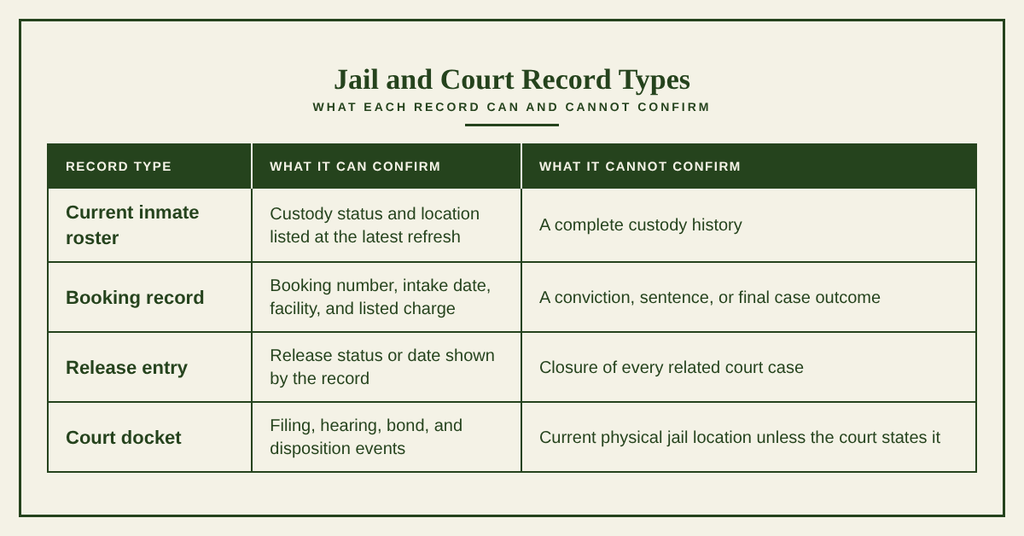
Search failures usually fall into four groups: the entered identity does not match the record, the person is held by another agency, the event is still being processed, or the display is limited for legal or policy reasons. Comparing the symptom with the table below can show the next useful step without repeating the same search unchanged.
Delayed Records for Recent Bookings & Releases
Greenville County’s inmate roster refreshes multiple times daily, but it is not a continuous tracking service. The posted schedule does not remove intake, identity verification, data entry, or status-transfer delays. A new booking can appear after a later refresh, and a release can remove a person only after the roster receives that change.
Compare the booking or release time with the time of your search. If an event happened close to the last refresh, check again after another cycle rather than treating the first result as final. Urgent matters should not depend on the next expected update. Direct official verification is the safer choice when travel, a court deadline, transportation, or family contact cannot tolerate a delay.
What to Do If Online Records Are Unavailable
If the search page will not load, confirm that the address ends with Official Search Portal is copied exactly. The full address appears earlier on this page. Reload once, then try a current browser or another device if the first attempt fails. Browser extensions that block scripts or pop-ups can also stop some search forms from working.
Before calling, write down the exact legal name, inmate ID or booking number, search terms, time, and any error message shown. That record helps staff locate the same event without repeating the full story. Do not treat a third-party people-search page as official custody proof, since those pages may use older data or records from the wrong jurisdiction.
If the official page remains unavailable, use the facility contact at the end of this page. Ask for current custody verification or the proper request process for a historical record. Avoid asking staff to disclose case facts outside their custody role; court questions belong to the relevant court record or clerk.
Contact Information
Use this Greenville County facility listing for a current custody check, booking confirmation, roster question, or search-page problem. A direct phone check can confirm a time-sensitive result that may be waiting for the next roster refresh.
Frequently Asked Questions
Below are quick answers to common questions about using the Greenville County inmate search tools and understanding the information they provide.
How to search inmate records in Greenville County?
Visit the official Greenville County inmate search portal at https://greenvillecountysc.gov/disclaimer/InmateSearch.aspx. Enter the inmate’s full name or ID number in the search fields. The system returns the booking date, custody status, housing location, and a brief charge summary. Results reflect the latest update of the county roster. If you need further details, contact the jail at (864) 467‑2309 during any hour, as the facility operates 24/7.
Can I find an inmate by name online?
Yes. The online inmate lookup accepts a person’s name as the primary query. Type the first and last name exactly as known; partial matches may also appear. The search returns matching records with current custody status and location. For best results, include middle initials or known aliases. If no match appears, verify spelling or try the inmate’s ID number if available. The portal updates regularly, so a recent booking should be visible within a few hours.
How often are jail inmate lists updated?
Greenville County updates its inmate database several times each day. Each update reflects new bookings, releases, transfers, and status changes. The website notes the timestamp of the last refresh on the results page. Because updates are frequent, a newly booked inmate may appear within a few hours, while a recent release might take up to 24 hours to be removed. For time‑sensitive inquiries, call the jail directly at (864) 467‑2309.
Why might an inmate not appear in search results?
An inmate may be missing from the online list for several reasons. The individual could be in a different jurisdiction, such as a state prison or federal facility, which the county system does not cover. Records might also be pending entry if the booking occurred very recently. In some cases, privacy rules hide certain detainees, like juveniles or those in protective custody. If you believe the person should be listed, verify the correct jurisdiction and consider contacting the sheriff’s office.
How to locate a recently released inmate?
To find someone who has been released, start with the same inmate search portal and look for a “released” status in the results. The record will show the release date and any scheduled post‑release supervision. If the portal shows no record, the individual may have been transferred to another facility or placed under parole. Contact the Greenville County jail at (864) 467‑2309 for confirmation, and ask for the next steps to obtain release documentation.